
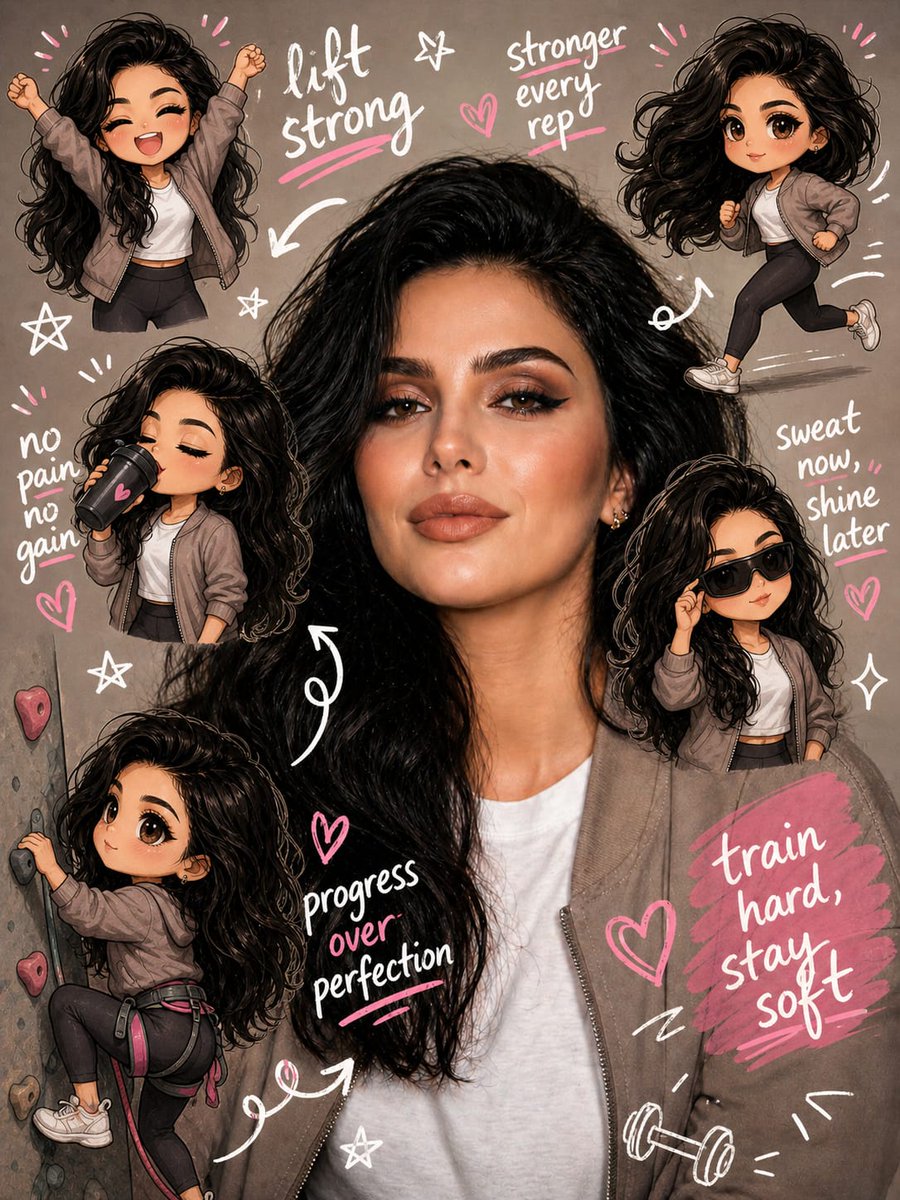
Gym Chibi Sticker Overlay
A prompt to edit a gym photo by adding multiple chibi versions of the subject performing various workout activities.
This character prompt is a strong starting point when you need a composed GPT Image 2 result with a clear subject, visual structure, and reusable style direction.
Aspect ratio
1:1 or 4:5
Quality pass
Standard first, then high detail
Workflow
Start text-to-image, then rerun with one focused edit at a time.
Full GPT Image 2 prompt
English prompt
Edit the image while keeping the original photo completely unchanged, including the person, face, body, pose, lighting, and gym background. Add multiple small, cute {argument name="sticker style" default="chibi-style “mini versions”"} of her around the image. Each mini character should have a big head, expressive facial features, and match her hairstyle and outfit. Depict each mini version doing different {argument name="activity theme" default="gym-related activities"}: one cheering with arms raised, one running in running shoes, one drinking from a shaker bottle, one wearing sporty running glasses, one climbing near her leg. Enhance the image with playful, hand-drawn doodles and handwritten notes in {argument name="accent colors" default="white and pink ink"}, in a scrapbook style. Include elements like arrows, stars, hearts, sparkles, and sketchy lines. Add cute, handwritten gym-themed motivational phrases: “lift strong”, “stronger every rep”, “no pain no gain”, “sweat now, shine later”, “progress over perfection”, “train hard, stay soft”. The overall vibe should feel fun, energetic, and feminine

Add a small image3.org text watermarkRelated GPT Image 2 prompts
Anime Martial Arts Battle Illustration
Generates a dynamic, high-impact anime illustration of two female characters fighting in a traditional dojo with elemental energy effects.
Illustrated City Food Map
Generates a hand-drawn, watercolor-style tourist map featuring numbered local food specialties, landmarks, and a legend.
Momotaro Explainer Slide in Hybrid Style
A prompt that combines the simple, warm aesthetic of simple illustration style illustrations with the high-information density characteristic of Japanese government slides.
E-commerce Live Stream UI Mockup
Generates a realistic social media live stream interface overlaying a portrait, featuring customizable chat messages, gift popups, and a product purchase card.
Censored Elven Adventurers in Medieval Village
Generates a cinematic fantasy scene of two detailed elven adventurers walking through a medieval village with castle backdrop and obscured faces.
Faceless Cyberpunk Infiltrator
Generates a cinematic anime scene of an armed faceless woman infiltrating a high-security futuristic server room.