产品设计英文
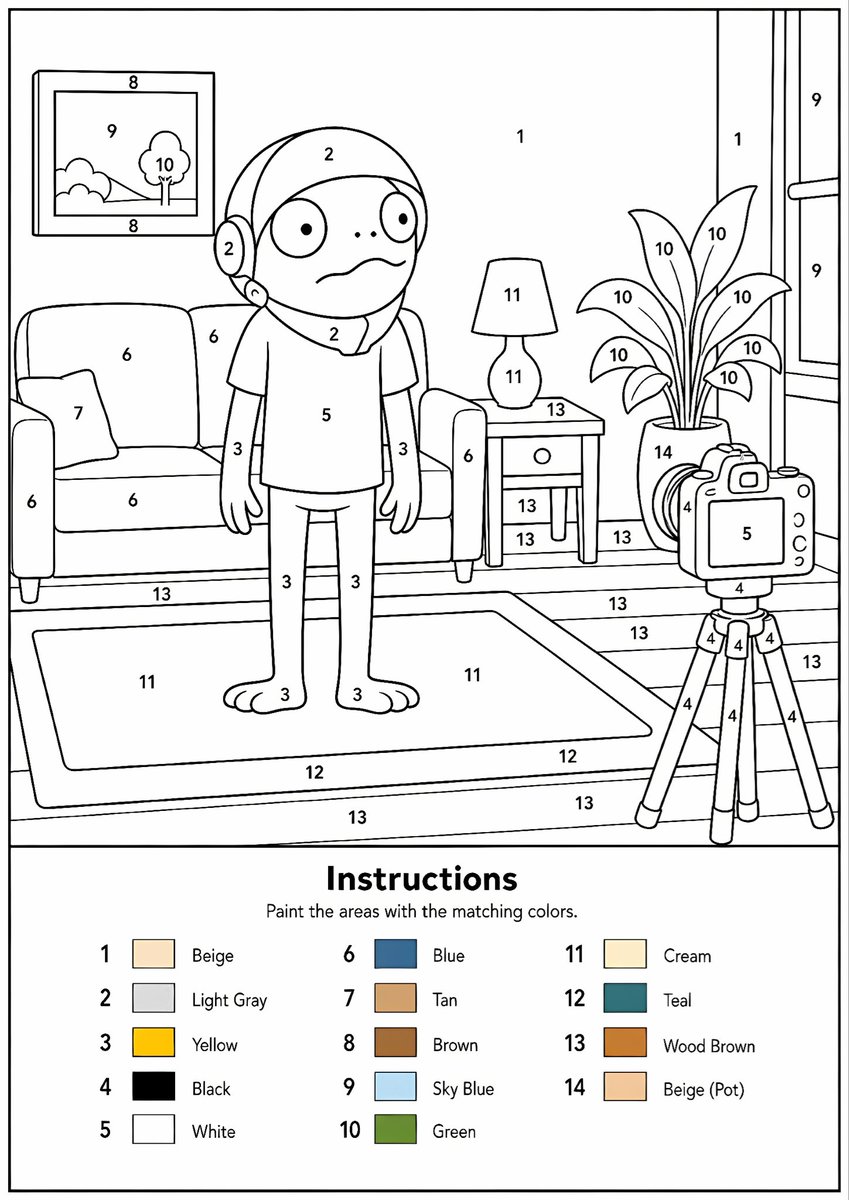
可打印数字油画生成器
将任何参考图像转换为专业的黑白数字油画模板,包含清晰的轮廓、编号区域和颜色图例。
适合快速搭建产品图、包装展示和品牌海报:主体、材质、背景与商业修图方向已经有框架,换掉变量就能开跑。

画幅建议
4:5 或 3:4
细节策略
直接用细节精修
生成流程
先用文字生成定主画面,再一次只改一个重点细节。
完整 GPT Image 2 提示词
英文
Create a professional high-resolution paint-by-numbers template from the provided image as a single PNG only. Use an {argument name="canvas size" default="A4 portrait ratio canvas"} at 300 DPI with a pure white background. The main artwork must be a clean black-and-white line drawing containing only black outlines, black numbers, and white unfilled paintable areas. Do not create a PDF, document, mockup, multi-page layout, or colored version. Do not use color, gray, shading, texture, gradients, transparency, or pre-filled areas in the main artwork.

Analyze the original image and choose the number of colors adaptively based on image complexity, from 1 to a maximum of {argument name="color count" default="14 colors"}. If the image has only 1–2 important colors, use only 1–2 colors; for simple images use 3–6 colors; for medium complexity use 7–10 colors; for complex, photographic, or highly detailed images use 11–14 colors. Do not force unnecessary colors. Assign each selected color one unique number and merge similar shades unless separation is essential for recognition.

Convert the image into simplified, fully closed, easy-to-paint regions while preserving the recognizable composition, main objects, characters, text, logos, foreground, background, and key details. Every paintable white region must contain the correct black number, centered clearly inside the matching area, readable, upright, and not touching outlines. Large black or dark areas from the original must remain white paintable regions with the correct number, not filled black. Only tiny permanent black line details, such as mouth lines, nostrils, pupils, eyelashes, seams, or small decorative strokes, may remain unnumbered.

At the bottom of the same PNG, add a neat legend section with the heading “Instructions”, the sentence “Paint the areas with the matching colors.”, and a list of every used number with a small color swatch and the English color name. Color swatches may appear only in the legend. Ensure the numbering exactly matches the legend, every paintable area is numbered, all regions are closed, and the final result is clean, professional, print-ready, and recognizable as the original image.
英文
将提供的图像转换为专业的单张高分辨率 PNG 格式数字油画模板。请使用 {argument name="canvas size" default="A4 纵向比例画布"},分辨率为 300 DPI,背景为纯白色。主体艺术作品必须是清晰的黑白线条画,仅包含黑色轮廓、黑色数字和白色未填充的可涂色区域。请勿创建 PDF、文档、样机、多页布局或彩色版本。主体艺术作品中不得使用颜色、灰色、阴影、纹理、渐变、透明度或预填充区域。

分析原始图像,并根据图像复杂度自适应选择颜色数量,范围从 1 种到最多 {argument name="color count" default="14 种颜色"}。如果图像仅有 1-2 种重要颜色,则仅使用 1-2 种;简单图像使用 3-6 种;中等复杂度使用 7-10 种;复杂、摄影类或高度详细的图像使用 11-14 种。不要强行使用不必要的颜色。为每种选定的颜色分配一个唯一的数字,除非为了识别必须区分,否则请合并相似的色调。

将图像转换为简化、完全闭合且易于涂色的区域,同时保留可识别的构图、主体对象、角色、文本、徽标、前景、背景和关键细节。每个可涂色的白色区域必须包含正确的黑色数字,数字需清晰居中于匹配区域内,且易于阅读、正向放置且不接触轮廓。原始图像中的大面积黑色或深色区域必须保留为带有正确数字的白色可涂色区域,而不是填充为黑色。仅微小的永久性黑色线条细节(如嘴部线条、鼻孔、瞳孔、睫毛、接缝或小型装饰笔触)可以保持无编号状态。

在同一张 PNG 的底部,添加一个整洁的图例部分,标题为“Instructions”,正文为“Paint the areas with the matching colors.”,并列出每个使用的数字及其对应的小色块和英文颜色名称。色块仅可出现在图例中。确保编号与图例完全匹配,每个可涂色区域均已编号,所有区域均已闭合,最终结果应整洁、专业、适合打印,并能清晰识别出原始图像。相关 GPT Image 2 提示词
产品设计
抽象矢量图标素材项目
生成一个包豪斯风格的几何图标样式项目,包含六个抽象的前端素材主题和一条七色调色板。
产品设计
日本 AI 商业信息图
生成一张简洁的四步日本风格信息图,解释如何将 AI 创意与实际业务流程相结合。
产品设计
Minimal Developer Portfolio Homepage
Generates a clean grid-based personal website homepage mockup for a software engineer portfolio design system.
产品设计
晨露粉蝶花微距摄影
生成一张写实的微距照片,展现晨曦中挂满露珠的蓝色粉蝶花,非常适合用于梦幻般的自然花卉艺术创作。
产品设计
日语阅读教学信息图
将手写的日语教学笔记转换为结构化的信息图,以便与教育工作者分享课程设计理念。
产品设计
streaming platform 首页 UI 生成器
一个功能性提示词,用于创建 streaming platform 首页 UI,通过上传的图片生成电影标题和海报。