Create product photography, educational graphics, and interior concepts with MiniMax H3 Image. Start from text or edit your own references, then choose the composition, resolution, and format for your next image.
Sign-in and credits required to generate. Browsing prompts is free.
Product photography · material, light, and composition
Original AI-created illustrations for this guide, not MiniMax H3 Image outputs or official samples.
Try the MiniMax H3 Image generator online
The model is already selected. Write your brief or choose a prompt concept; selecting an example fills the prompt without starting generation. For editing, switch to Image to Image and upload your references.
Loading the MiniMax H3 Image generator…
THREE BRIEFS TO START WITH
MiniMax H3 Image prompts for useful creative work
A useful prompt names a deliverable and the decisions that shape it. Adapt these original briefs to your product, lesson, or room. The illustrations show the intended direction; they are not benchmark results.
For product teams and independent shops
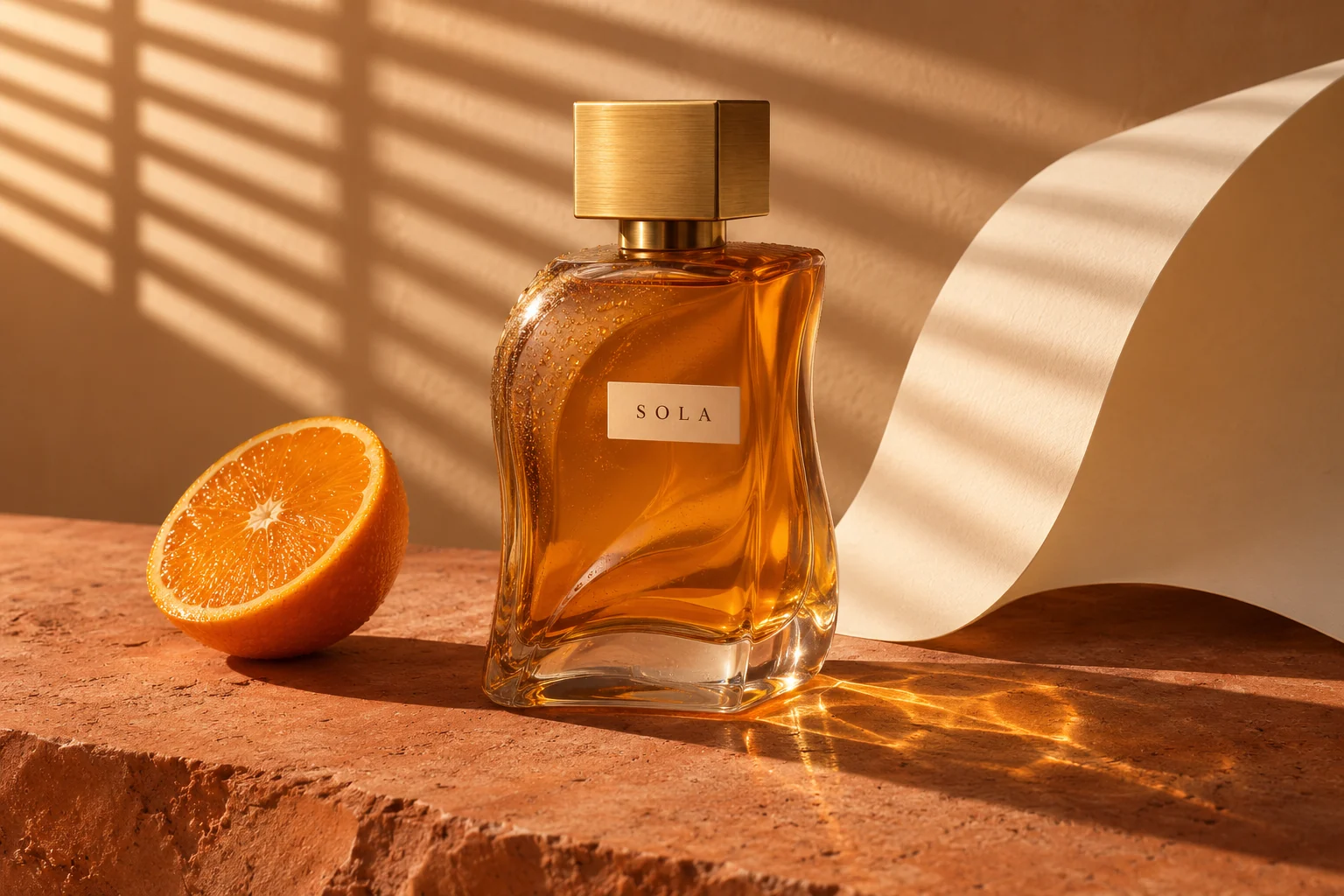
Product photography with material detail
Selling an existing product? Switch to Image to Image and attach its photograph. Ask to preserve the bottle silhouette, cap, and label instead of inventing a replacement.
Read the complete prompt
Create a landscape product photograph of an amber glass perfume bottle with a square brushed brass cap. A small cream label reads exactly "SOLA". Place it on warm terracotta stone beside half an orange and a curved cream paper backdrop. Sunlight from the upper left passes through slatted blinds. Show realistic refraction, glass caustics, stone grain, and gentle contact shadows. Keep the bottle as the clear focal point. No extra text or objects.
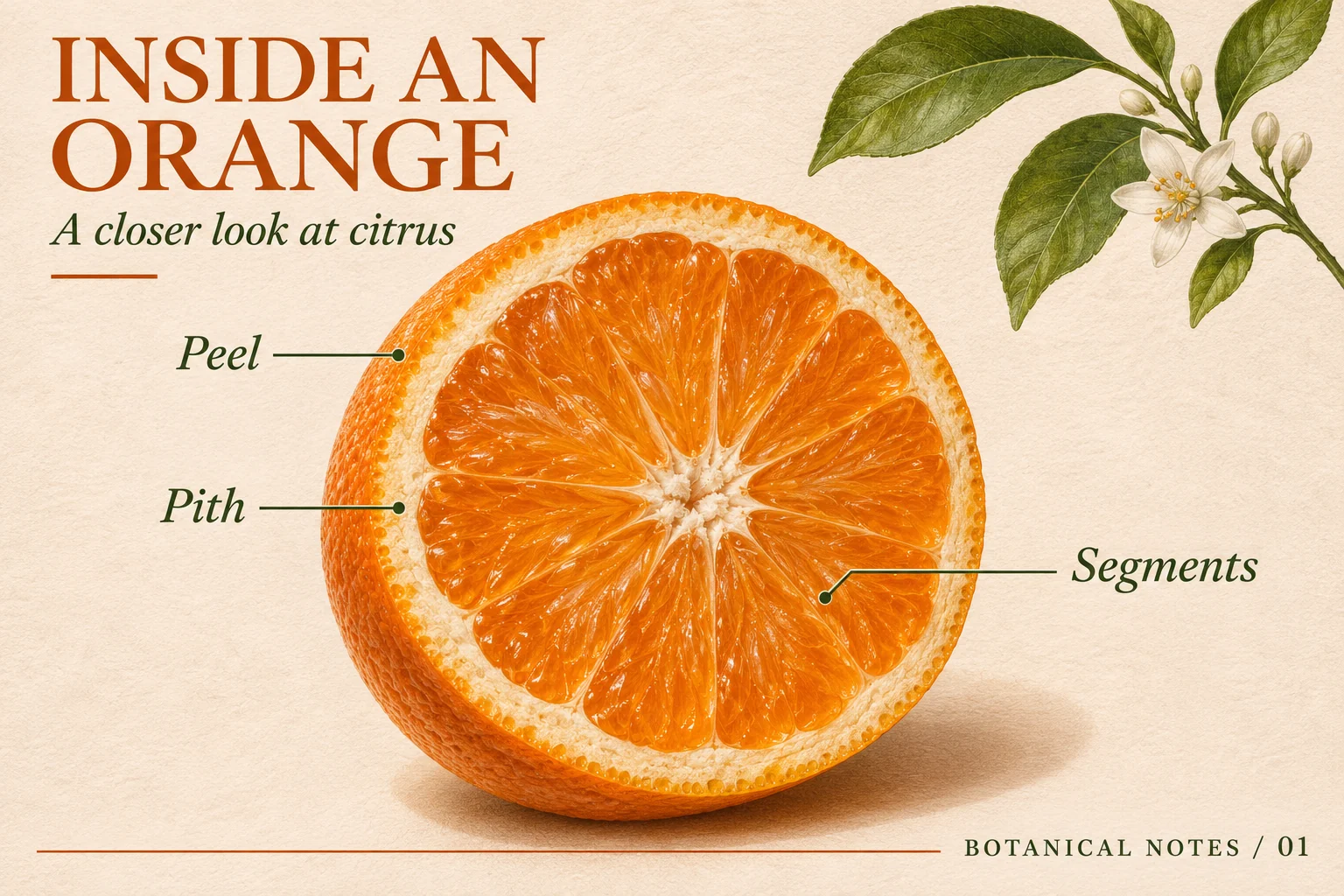
Supply the facts yourself. Keep the first version to a few short labels, check that each leader line reaches the correct structure, and proofread the result at full size.
Read the complete prompt
Design a landscape botanical infographic on ivory textured paper. Title at the upper left: "INSIDE AN ORANGE". Subtitle: "A closer look at citrus". Show a detailed cut orange in the center with exactly three leader lines: "Peel" pointing to the outer colored skin, "Pith" to the white layer beneath it, and "Segments" to the juicy interior. Add a small leafy branch in the upper right. Footer: "BOTANICAL NOTES / 01". Use dark green labels and burnt-orange headings, generous margins, and no other text.
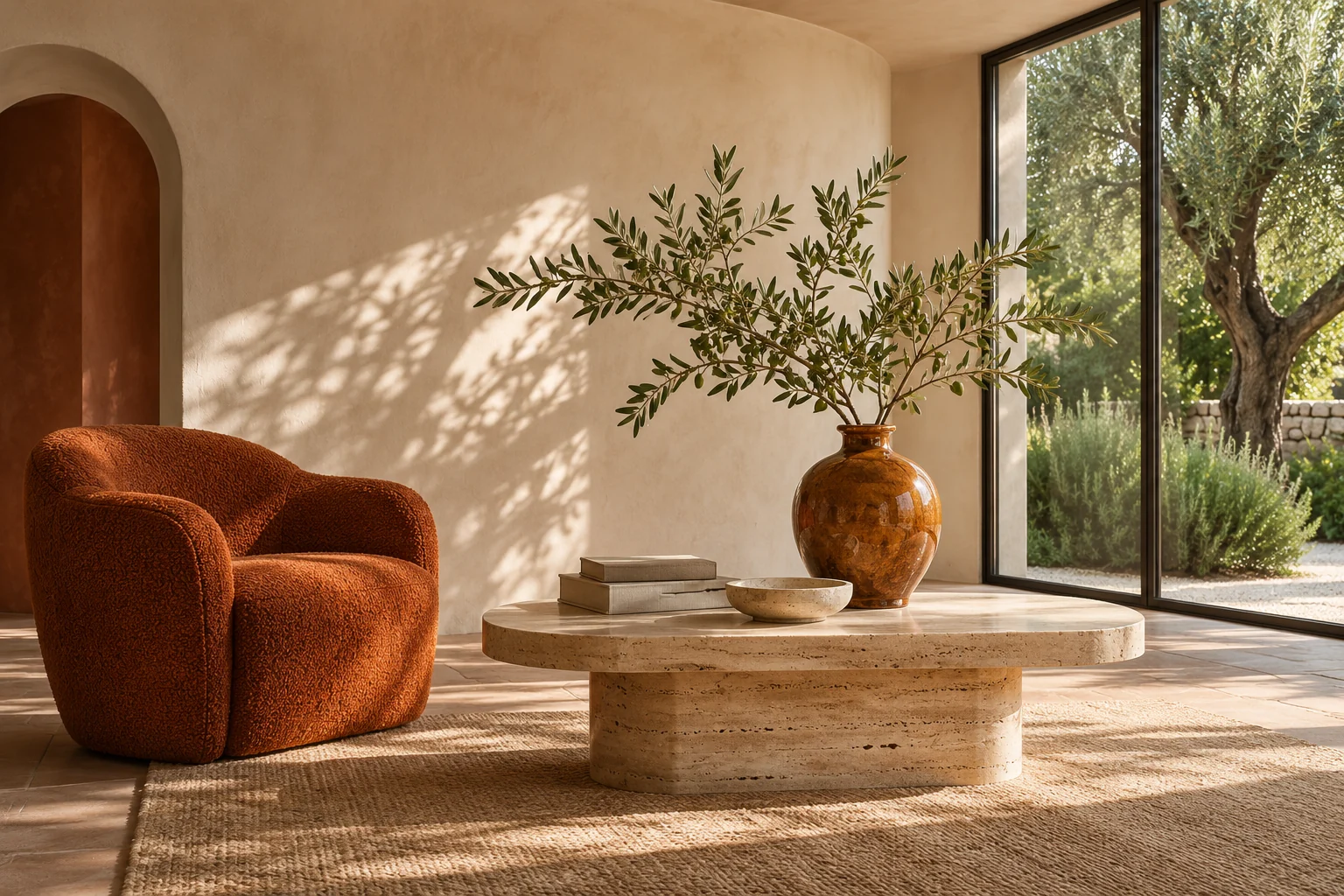
For an existing room, upload the room and furniture references separately. Describe which image supplies the architecture and which supplies the chair; preserve camera angle and window positions.
Read the complete prompt
Create an architectural photograph of a calm living room. Place one rust-orange boucle armchair on the left, a low travertine coffee table in the center, and a tall garden-facing window on the right. Put an olive branch in an amber ceramic vase on the table. Cream plaster walls, warm stone floor, soft afternoon sunlight, believable furniture scale, straight verticals, and natural shadows. View from seated eye level. No people, text, or logos.
Original AI-created illustrations for this guide, not MiniMax H3 Image outputs or official samples.
What is MiniMax H3 Image?
MiniMax H3 Image is a still-image model from MiniMax that combines text-to-image generation and reference-based image editing in one checkpoint. Its documented focus includes detailed imagery, instruction following, and native output around 16 megapixels. Image3 provides hosted access for creating and refining pictures. The related H3 video model handles a different workflow.
The model’s full capabilities and this editor’s controls differ. Here you get 1K, 2K, or 4K output, up to four references, a 5,000-character prompt, and one PNG or JPEG per task. See the workflow comparison for the practical limits.
01
High resolution for details that matter
MiniMax documents native images around 16 megapixels without a separate upscaler. Use the 4K preset when you need room to inspect texture or crop a composition. The 4K tier describes total image area; it does not mean every aspect ratio is 4096 pixels wide.
02
Instructions with a visible purpose
Start with the deliverable, then name the subject, layout, materials, and lighting. A brief such as “one bottle left of center, empty space on the right for copy” gives the generator a more useful composition than a list of quality adjectives.
03
Reference editing with assigned roles
Use up to four images in this editor. Identify references as <Picture 1>, <Picture 2>, and so on in upload order. Explain which supplies the product, room, palette, or style, then state the features that must stay unchanged.
04
Text you can actually review
For posters and educational graphics, quote the exact words and specify their position. Separate headline, labels, and footer rather than asking for an unspecified text-heavy design. Inspect spelling, numbers, and diagram connections before publishing.
How to use MiniMax H3 Image
1
Choose creation or editing
Use Text to Image for a new composition. Use Image to Image for an existing subject or layout, then upload one to four references you have permission to use.
2
Write the brief and choose output
Describe the deliverable, subject placement, exact text, materials, and light. Choose an aspect ratio, 1K, 2K, or 4K, and PNG or JPEG. This generator accepts up to 5,000 prompt characters.
3
Check credits, then inspect the image
Review the displayed credit cost before generating. Check the result for label accuracy, reference fidelity, object geometry, and unwanted changes. Refine one specific issue at a time and download the final image.
A reference-editing prompt you can adapt
Upload your product as the first image and a background reference as the second. Choose Image to Image, then state each image’s role and the details to preserve:
Use the perfume bottle from <Picture 1> and the lighting and stone backdrop from <Picture 2>. Keep the bottle shape, cap, label wording, and camera angle unchanged. Replace only the surroundings. Match the contact shadows and reflections to the new setting. Do not add extra products or text.
Inspect the label and silhouette after each edit. For a region you need to mark explicitly, use AI Inpainting. For help describing a reference, start with Image to Prompt.
Text-to-image or reference editing: choose your workflow
Use creation for a new visual and editing when an existing subject matters. These are the settings available in this Image3 generator.
MiniMax H3 Image settings on Image3
Setting
Text to Image
Image to Image
Best starting point
A new composition from a written brief
A product, subject, or layout to preserve
Reference images
None
1–4 images, in upload order
Prompt length
1–5,000 characters
1–5,000 characters
Resolution
1K, 2K (default), or 4K
1K, 2K, or 4K
Aspect ratio
Auto, square, portrait, landscape, ultrawide
The same presets; Auto follows the first reference
Download
One PNG or JPEG
One PNG or JPEG
Credit calculation
Output resolution
Output resolution + reference count
MiniMax documents up to 16 references for the broader model; this page accepts four. Upload JPG, PNG, WebP, HEIC, or BMP files up to 20 MB each and 64 megapixels. Prompt-based editing here does not include masks or transparent-background generation.
Comparing models? Explore GPT Image 2 and Seedream 5.5, then judge the same brief by composition, text accuracy, reference fidelity, and the cost shown in each generator.
MiniMax H3 Image pricing on Image3
Generation uses Image3 credits. The output tier sets the base cost, and editing adds 5 credits per reference. These are Image3 charges, not MiniMax’s direct API prices.
1K output
10credits / image
Text to image: 10 credits. Edit with 1 reference: 15 credits. Edit with 4 references: 30 credits.
2K output · default
10credits / image
Text to image: 10 credits. Edit with 1 reference: 15 credits. Edit with 4 references: 30 credits.
4K output
30credits / image
Text to image: 30 credits. Edit with 1 reference: 35 credits. Edit with 4 references: 50 credits.
Start at 2K to review the layout, then consider 4K when finer inspection or cropping matters. The selected settings determine the charge shown before generation. Plan prices and credits are listed below and on the pricing page.
Choose your Image3 credit plan
Use your Image3 credits for MiniMax H3 Image and other supported tools. Compare the current plan details below.
Cancel Anytime
Flexible plans you can switch anytime.
Bank-Level Security
Encrypted checkout for every payment.
Long-Lasting Credits
One-time credits stay valid for 12 months.
Buy On Demand, Create Flexibly
Use credits instantly, top up anytime, no subscription required.
Starter Pick
Starter Pack
Original$39.9 one-time
$29.9one-time
Promo about $0.15 / image
Use it instantly and start creating right away. Top up only when you need more.
4,000 credits · ~$0.75 per 100 credits
No subscription • Use anytime in 12 months • 25% off today
Secure checkout · credits are added instantly · no recurring charge
Perfect For Testing
Create up to ~200 Standard 1K text-to-image results during the promo
Test prompts and quality risk-free
Text-to-image and image-to-image
Valid for 1 full year
Watermark-free downloads included
Commercial-ready image creation included
High Frequency
Creator Pack
Original$79.9 one-time
$59.9one-time
Promo about $0.13 / image
A flexible top-up option for creators who generate and edit images more often.
9,000 credits · ~$0.67 per 100 credits
Most popular top-up • 25% off today • No expiry pressure
Secure checkout · credits are added instantly · no recurring charge
More Credits, Better Price
Create up to ~450 Standard 1K text-to-image results during the promo
33% better value per credit
Great for weekly creation
Valid for 1 full year
Watermark-free downloads included
Commercial-ready image creation included
Lowest Unit Cost
Pro Pack
Original$129.9 one-time
$99.9one-time
Promo about $0.12 / image
A flagship credit pack built for heavy creators and batch work.
16,000 credits · ~$0.62 per 100 credits
Lowest per-credit cost • 23% off today • Stock up and save
Secure checkout · credits are added instantly · no recurring charge
Maximum Value
Create up to ~800 Standard 1K text-to-image results during the promo
Best price per credit
Perfect for batch creation
Valid for 1 full year
Watermark-free downloads included
Commercial-ready image creation included
Pro Plans
Unlock more image output with lower long-term creation costs.
Annual Best Seller
Pro Annual Plan
$12.9/ month
Limited paid-user promo: GPT Image 2 Standard 1K text-to-image at half price
Promo about $0.06 / image
During the limited promo, paid users get GPT Image 2 Standard 1K text-to-image at half price.
48,000 credits · ~$0.32 per 100 credits
Secure checkout · credits are added instantly · subscriptions can be canceled anytime
Pro annual benefits
48,000 image credits per year
Limited 50% off GPT Image 2 Standard 1K text-to-image
Faster generation priority, less waiting
Commercial-grade privacy, visible only to you
Distraction-free workflow, no ads
Watermark-free exports ready to deliver
Pro-grade detail enhancement and image polish
Early access to new features
Batch generation support (coming soon)
Optimized workflows for ecommerce, game assets, and ads (coming soon)
Cloud asset library (6-month storage)
Priority premium support
Best Unit Price
Studio Flagship Plan
$19.9/ month
Limited paid-user promo: GPT Image 2 Standard 1K text-to-image at half price
Promo about $0.05 / image
A flagship plan for high-frequency teams, with GPT Image 2 Standard 1K text-to-image at half price during the promo.
96,000 credits · ~$0.25 per 100 credits
Secure checkout · credits are added instantly · subscriptions can be canceled anytime
Studio flagship benefits
96,000 image credits per year
Limited 50% off GPT Image 2 Standard 1K text-to-image
Faster generation priority, less waiting
Commercial-grade privacy, visible only to you
Distraction-free workflow, no ads
Watermark-free exports ready to deliver
Pro-grade detail enhancement and image polish
Early access to new features
Batch generation support (coming soon)
Optimized workflows for ecommerce, game assets, and ads (coming soon)
Unlimited history for finished work
Priority premium support
Higher upload limits for large projects
How Image Credits Work
Credit usage depends on model, resolution, generation mode, and optional search features.
1K / text-to-image / paid promo
20 credits
1K / text-to-image / free user
40 credits
1K / image-to-image / standard
50 credits
Multi-idea mode / 4 images / 1K
200 credits
High-detail studio / 2K / medium
180 credits
Secure payment methods
*
*
Payments are encrypted and securely processed by Stripe or PayPal.
* Alipay and WeChat Pay are available for eligible CNY one-time purchases.
MiniMax H3 Image FAQ
What is MiniMax H3 Image?
MiniMax H3 Image, officially written MiniMax-H3-Image, is MiniMax’s image generation and editing model in the H3 family. It creates still images from text and edits images using visual references. Image3 offers an independent browser-based generator for these tasks.
Is MiniMax H3 Image the same as the H3 video model?
They belong to the same model family but serve different tasks. This page generates and edits still images. It does not provide H3 video generation, motion controls, or audio output.
How many reference images can I use?
This Image3 editor accepts one to four reference images per editing task. MiniMax’s model documentation describes support for up to 16 references, but that broader model limit is not the upload limit of this page. Refer to your uploads as <Picture 1>, <Picture 2>, and so on.
Does it support 4K and 16-megapixel images?
Yes. The generator offers 1K, 2K, and 4K presets. At 4K, a square image is 4096 × 4096 pixels, while a 16:9 image is 5472 × 3072 pixels. Both are about 16 megapixels. Final dimensions depend on the selected aspect ratio.
Is MiniMax H3 Image free to use online?
Generation on Image3 uses credits. Text-to-image costs 10 credits at 1K or 2K and 30 credits at 4K. Editing adds 5 credits per reference image. Any trial balance is subject to the current account offer; there is no unlimited free-generation promise.
Which upload and download formats are supported?
Upload JPG, PNG, WebP, HEIC, or BMP references, up to 20 MB each. The provider also limits a reference to 64 megapixels. Choose PNG or JPEG for the generated image. Each task returns one image.
Can I generate transparent backgrounds or use an inpainting mask?
MiniMax’s current image API does not support transparent-background generation or mask-based inpainting. A PNG download alone does not imply transparency. Use this editor for prompt-based changes, or open Image3’s dedicated AI Inpainting tool when your task needs a mask.
Is MiniMax H3 Image available for local use or ComfyUI?
MiniMax publishes model weights and local deployment instructions, including ComfyUI resources, in its official repository. Those options use the MiniMax-H3-Image Community License Agreement and require a separate setup. This page provides hosted access without a local installation.
Can I use generated product or portrait images commercially?
Check the applicable model license, Image3 terms, and rights to your references before commercial use. Review labels and product features for accuracy. Get permission for identifiable people and label synthetic imagery where required; do not present a generated scene as documentary evidence.
Image3 is an independent service and is not affiliated with or endorsed by MiniMax. Model names belong to their owners. Review the terms of service before publishing commercial work.