
Targeted image editing
ByteDance highlights better preservation of areas outside an edit. In practice, give one change at a time and explicitly name what should stay: framing, label text, face, or lighting.
BYTEDANCE SEED · IMAGE GENERATION & EDITING
Make the details work together.
Turn a visual brief into product photography, posters, and reference-based edits. Start with Seedream 5.5 selected, then choose your composition, resolution, and output format.
Write a new brief or choose an example. For editing, upload your own JPEG, PNG, or WebP references, up to 5 MB each. Generation requires sign-in and available credits; selecting an example only fills the prompt.
Seedream 5.5 is ByteDance Seed’s multimodal image model for creating pictures from text and editing existing images. Released on November 9, 2026, it focuses on repeated edits, natural-looking materials and lighting, and more accurate text. Image3 provides an independent online workflow through KIE AI, with model controls and credit costs shown on this page.
ByteDance highlights better preservation of areas outside an edit. In practice, give one change at a time and explicitly name what should stay: framing, label text, face, or lighting.
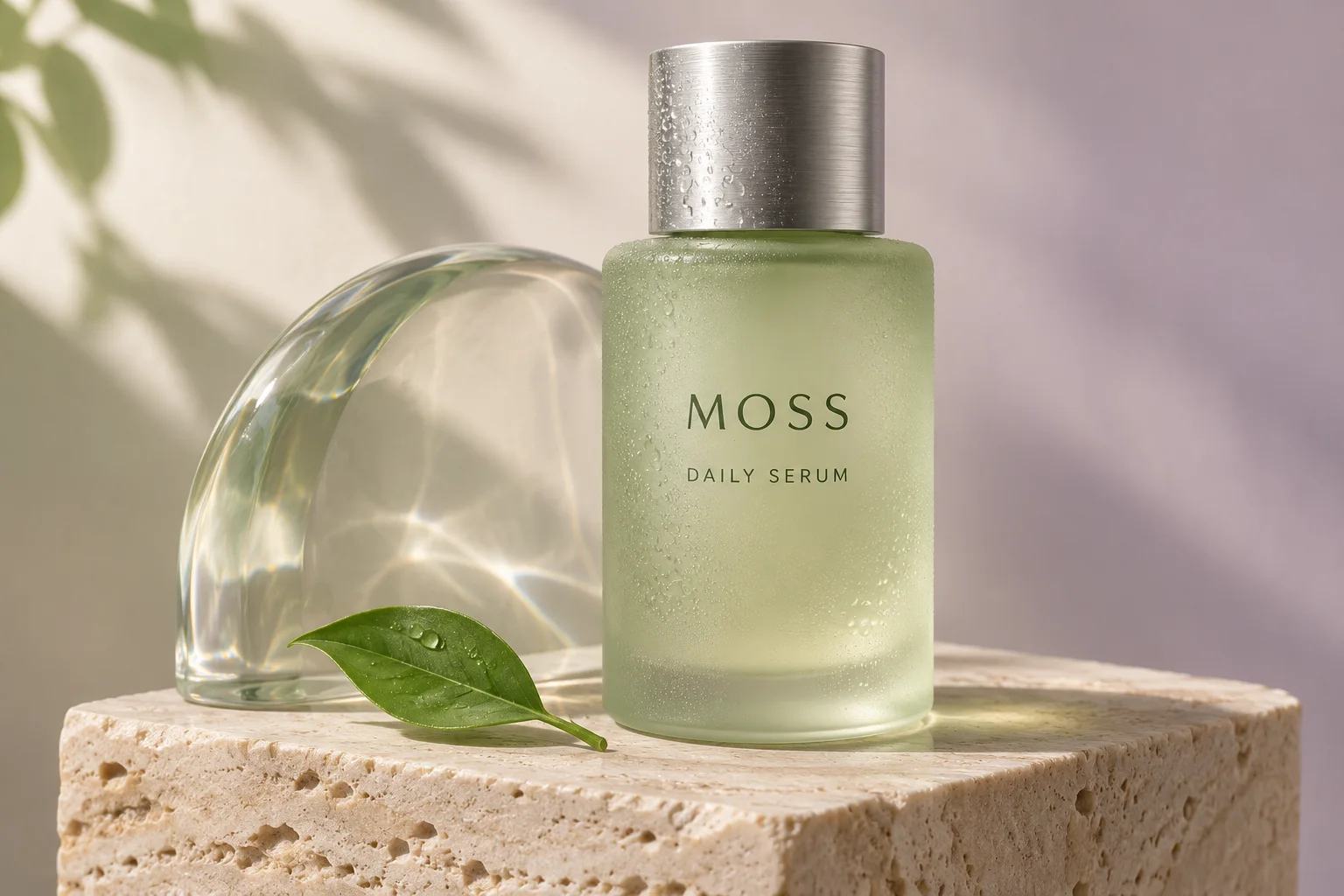
Describe the surfaces and the light that reveals them: frosted glass, brushed metal, woven fabric, or matte paper. A useful product brief specifies both the subject and its contact shadows.
Write the exact headline in quotation marks, then specify its placement and size relative to supporting text. Proofread every line before publishing, especially labels, numbers, and small print.
The official release includes native RGBA generation. This page currently exposes PNG/JPEG generation and reference editing, without a dedicated transparency or layer-decomposition control. PNG alone does not guarantee an alpha channel.
Begin with a concrete deliverable. These original examples illustrate two useful directions: controlled product lighting and a poster with precise typography. Adapt the subject, text, and composition to your project.
For a real product, switch to image editing and attach the product photo. Specify which label, shape, and color must remain recognizable.
Prompt
Create a premium product photograph of a pale moss-green frosted glass serum bottle on a cream travertine plinth. Use a brushed silver cap, one clear glass shape, and a small green leaf. Label text: "MOSS" and "DAILY SERUM". Soft window daylight from the upper left, fine condensation, realistic refraction, gentle contact shadows. Restrained ivory and sage palette. Landscape composition, no extra text.Use this prompt
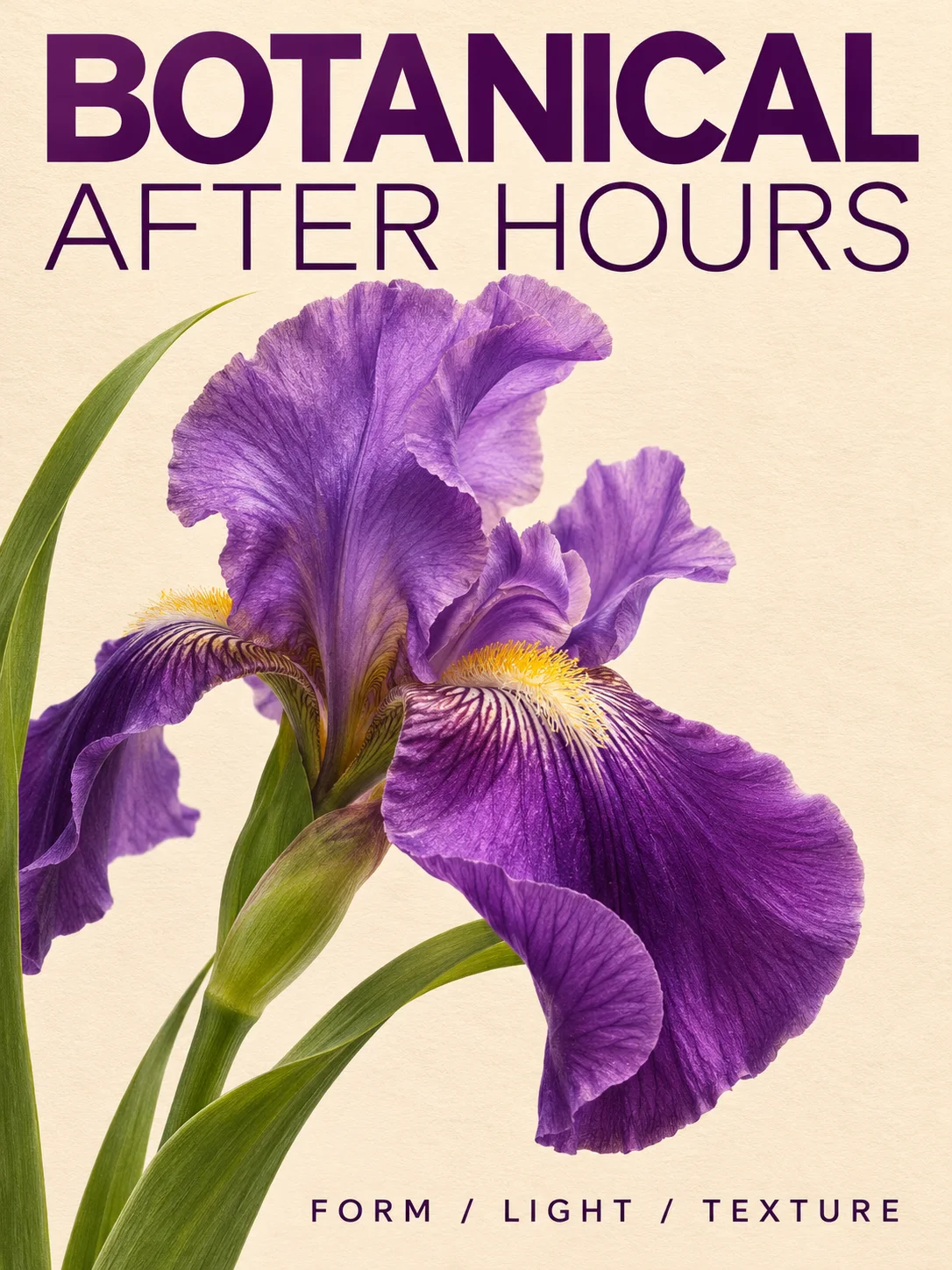
Keep the first version to a short headline and footer. Check spelling at full size, then add longer copy in a later revision or your layout editor.
Prompt
Design a portrait botanical exhibition poster on warm ivory paper. Feature a sculptural purple iris, green stems, and a clean editorial grid. Exact text only: "BOTANICAL" at the top, "AFTER HOURS" directly below, and "FORM / LIGHT / TEXTURE" in a small footer. Use deep violet typography, generous margins, crisp lettering, and detailed petals. No frame, watermark, or additional words.Use this prompt
Illustrative artwork created for this page, not a Seedream 5.5 output. Use the prompts to explore your own results.
Name the subject, intended use, composition, materials, lighting, and exact text. Keep the prompt between 5 and 5,000 characters.
Use text to image for a fresh composition. Use image editing with up to 10 references when a product, person, or existing layout should guide the result.
Choose 1K, 1.5K, or 2K and a supported aspect ratio. Pick PNG or JPEG. Start with a draft before spending credits on a more detailed version.
Inspect lettering, product proportions, hands, and edges. For another edit, upload the previous result and describe one specific change together with the details to preserve.
For a campaign team or store owner, consistency often matters as much as a new style. Keep a copy of the best version, use it as the next reference, and compare details after each revision.
Change only the backdrop to a pale lavender studio wall. Keep the bottle shape, cap, label text, camera angle, and stone plinth unchanged. Match the existing soft light and retain a realistic contact shadow.
Each revision is a separate generation. The official multi-turn editing demonstrations describe model behavior; they do not mean this page provides an automatic 100-step editing session.
The table uses the same credit calculator as the generator. Each task requests one output image. Editing adds a charge for every reference image, so the final cost depends on both resolution and reference count.
| Resolution | Text to image | Edit with 1 reference | Best starting point |
|---|---|---|---|
| 1K | 20 credits | 30 credits | Concepts and first drafts |
| 1.5K | 20 credits | 30 credits | Layout and text exploration |
| 2K | 35 credits | 45 credits | Detailed product visuals |
Additional reference image: +10 credits
Example: a 2K edit with 3 reference images: 65 credits
Use your Image3 credits across supported tools. Plan prices, billing periods, and included credits are shown below; the model’s per-image costs are listed above.
Use credits instantly, top up anytime, no subscription required.
Secure checkout · credits are added instantly · no recurring charge
Perfect For Testing
Secure checkout · credits are added instantly · no recurring charge
More Credits, Better Price
Secure checkout · credits are added instantly · no recurring charge
Maximum Value
Unlock more image output with lower long-term creation costs.
Secure checkout · credits are added instantly · subscriptions can be canceled anytime
Pro annual benefits
Secure checkout · credits are added instantly · subscriptions can be canceled anytime
Studio flagship benefits
Credit usage depends on model, resolution, generation mode, and optional search features.
Payments are encrypted and securely processed by Stripe or PayPal.
* Alipay and WeChat Pay are available for eligible CNY one-time purchases.
Compare the options available in this integration. Choose by the task and the cost of your next revision; this is a workflow comparison, not an independent quality benchmark.
| Control | Seedream 5.5 | Seedream 5.0 Pro |
|---|---|---|
| Output resolution | 1K, 1.5K, 2K | 1K, 2K |
| Reference images | Up to 10 | Up to 10 |
| Output formats | PNG, JPEG | PNG, JPEG |
| Editing charge | Per reference image | Fixed editing surcharge |
| A useful brief | Targeted revisions, material detail, typography | Structured layouts and reference-guided compositions |
Explore a backdrop or composition from a product reference. Check that the result preserves real packaging, proportions, and product attributes before using it in a listing.
Plan product detail imagesDevelop poster concepts with a defined headline, clear spacing, and a limited palette. Keep a separate editable copy of important text for the final layout.
Explore GPT Image 2Turn a visual reference into a more explicit brief before generating. Describe the structure you need, then decide which details to preserve and which to change.
Build a prompt from an imageYes. The embedded generator selects the Seedream 5.5 text-to-image model by default. Switch to image editing to use its corresponding editing model. Sign in and check your credits before generating.
Image3 uses credits for generation. Any available account credits are shown after sign-in; this page does not promise unlimited free use. Selecting a prompt example does not create a task or spend credits.
The output-resolution price plus the per-reference charge shown in the pricing table. For example, uploading three references adds three reference charges. The generator calculates the selected task cost before submission.
This integration exposes 1K, 1.5K, and 2K for Seedream 5.5. It does not offer a native 4K option on this page.
ByteDance documents native RGBA capability for the model. This page has no dedicated transparent-background or layer-decomposition control. Choosing PNG selects a file format; it does not promise transparency.
Use a clear reference, quote the text verbatim, and name what must remain unchanged. Request one edit at a time, keep earlier versions, and proofread the final image. Preservation and spelling are not guaranteed for every output.
The product and poster artwork are illustrative assets created for this page with a separate image tool. They illustrate the supplied briefs and are not benchmark results or verified Seedream 5.5 outputs.
Image3 is an independent service and accesses the model through KIE AI. It is not affiliated with or endorsed by ByteDance. Use images you have permission to upload, and review generated content before publication.
Create detailed images at 1K–4K or edit with up to four references.
Compare its generator, reference workflow, and credit costs.
Explore another image generation and editing model.
Use a dedicated tool when you want to mark a region for editing.
Review subscription terms and included credits.
Start with the subject, light, layout, and text. Then refine the details that matter.
Seedream 5.5 supports text-to-image and reference editing at 1K, 1.5K, or 2K.
Upload an image or video, then auto-detect subject, style, composition, and negatives.
Prompt concepts · illustrative artwork, not generated results. Select a card to fill its prompt.
No Images Generated